
Cos'e'#
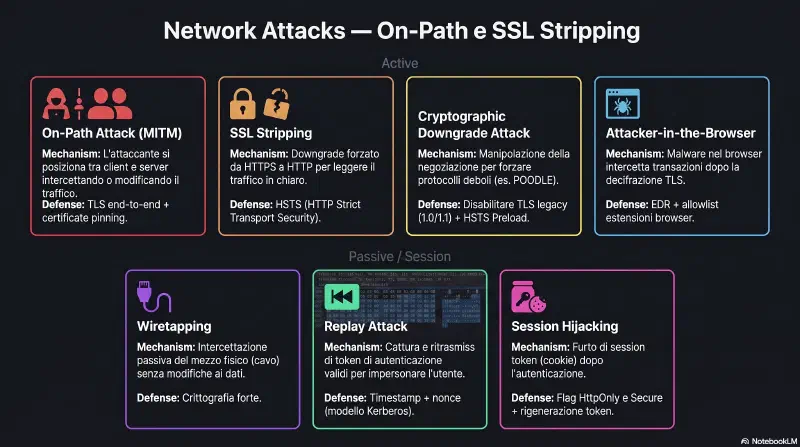
SSL Stripping e' un attacco on-path (MITM) che degrada silenziosamente una connessione HTTPS a HTTP. L'attaccante si interpone tra client e server: mantiene HTTPS con il server reale, ma serve HTTP al client. Il nome e' rimasto anche se oggi HTTPS usa TLS e non piu' SSL.
TL;DR#
- Il client digita
example.come il browser tentahttp://per default - Il server risponde con un redirect 301 verso
https://example.com - Quella risposta 301 viaggia in HTTP, in chiaro: e' il punto vulnerabile
- L'attaccante intercetta il 301 e blocca il redirect
- Il client resta in HTTP per tutta la sessione, senza saperlo
- L'attaccante parla HTTPS con il server: per il server tutto sembra normale
Attacco MITM che intercetta il redirect HTTP → HTTPS e mantiene il client in HTTP in chiaro, mentre l'attaccante parla HTTPS con il server reale
Come Funziona#
Il punto vulnerabile e' il gap tra il TCP handshake e il TLS handshake. La cifratura non esiste ancora nella fase di negoziazione iniziale.
sequenceDiagram
    participant C as Client
    participant A as Attaccante
    participant S as Server

    Note over C,A: TCP handshake in chiaro
    C->>A: HTTP GET http://example.com
    A->>S: HTTPS GET https://example.com

    Note over A,S: TLS handshake (A-S) cifrato
    S->>A: 200 OK + contenuto HTTPS
    A->>C: 200 OK + contenuto HTTP in chiaro

    Note over A: Attaccante vede tutto
    Note over C: Client vede http:// - nessun lucchetto
    Note over S: Server vede solo richieste HTTPS normali
Lettura diagramma: Il client invia HTTP al'attaccante credendo di parlare col server. L'attaccante fa la richiesta reale al server in HTTPS, riceve la risposta cifrata, la decifra, e la serve al client in HTTP puro. Il server non vede nulla di anomalo. Il client non vede nessun certificate warning perche' non ha mai tentato TLS.
flowchart TD
    A([Browser: http://example.com]) --> B

    subgraph TCP1["TCP Handshake - in chiaro"]
        B[SYN] --> C[SYN-ACK] --> D[ACK - canale aperto, nessuna cifratura]
    end

    D --> E

    subgraph FINESTRA["FINESTRA DI ATTACCO - TLS non ancora attivo"]
        E[Server: 301 Redirect a https://]
        E --> F{Attaccante intercetta?}
    end

    F -->|SI| G[Attaccante blocca il redirect\nserve HTTP al browser\nmantiene HTTPS col server]
    G --> H([SESSIONE IN CHIARO - http:// - Not Secure - attaccante vede tutto])

    F -->|NO| I

    subgraph TLS1["TLS 1.3 Handshake - in chiaro, negozia la cifratura"]
        I[Client Hello - versioni TLS - cipher suites - key share]
        I --> J[Server Hello - cipher suite - key share - Certificato - Finished]
        J --> K{Certificato trusted?}
    end

    K -->|NO| L([Certificate Warning - indicatore on-path attack])
    K -->|SI| M[Client Finished - entrambi derivano le chiavi di sessione]
    M --> N([SESSIONE CIFRATA - https:// - lucchetto - TLS attivo])

    style FINESTRA fill:#5c1a1a,stroke:#e05555,stroke-width:2px,color:#ffffff
    style H fill:#8b0000,stroke:#e05555,color:#ffffff
    style L fill:#8b0000,stroke:#e05555,color:#ffffff
    style N fill:#1a4a1a,stroke:#4aaf7e,color:#ffffff
    style G fill:#8b3a00,stroke:#ff7a4a,color:#ffffff
Lettura diagramma: Flowchart completo SSL stripping vs connessione sicura. Il TCP handshake e' sempre in chiaro. La finestra critica (rosso scuro) e' il momento in cui il server manda il redirect 301: se l'attaccante intercetta qui, il TLS non parte mai e la sessione resta in HTTP. Se non intercetta, parte il TLS handshake: se il certificato non e' trusted scatta il certificate warning; se e' OK la sessione diventa HTTPS cifrata (verde).
Indicatori nel browser:
- URL mostra
http://invece dihttps:// - Icona "Not secure" a sinistra della barra degli indirizzi
- Nessun lucchetto
- Nessun certificate warning: SSL stripping non usa un certificato falso
SSL stripping e' diverso da un MITM con certificato falso. Con SSL stripping il client non vede MAI un certificate warning perche' non tenta mai TLS. Con un MITM classico che usa un certificato fake, il browser avvisa l'utente. SSL stripping e' piu' insidioso: se l'utente non controlla il lucchetto, non se ne accorge.
HSTS - HTTP Strict Transport Security#
HSTS e' la difesa principale contro SSL stripping. Il server invia un header speciale che istruisce il browser a non tentare mai HTTP per quel dominio per un periodo definito.
Flusso HSTS nel tempo:
sequenceDiagram
    participant B as Browser
    participant S as Server

    Note over B,S: Prima visita - ancora vulnerabile
    B->>S: GET http://example.com
    S->>B: 301 Redirect a https://example.com
    B->>S: TLS handshake + GET https://example.com
    S->>B: 200 OK + Strict-Transport-Security: max-age=31536000
    Note over B: Browser salva regola nello HSTS store
    Note over B: example.com = solo HTTPS per 31536000 secondi

    Note over B,S: Visite successive - protetto
    Note over B: Browser consulta HSTS store prima di aprire TCP
    Note over B: Regola trovata - forza https:// internamente
    B->>S: https://example.com (HTTP mai tentato)
Lettura diagramma: Prima visita (in alto): il browser prova http://, riceve il 301, fa TLS handshake, riceve la risposta con l'header HSTS, salva la regola nello HSTS store. Visite successive (in basso): il browser consulta lo HSTS store prima ancora di aprire il TCP handshake, trova la regola, forza https:// internamente. HTTP non viene mai tentato, SSL stripping non ha finestra di attacco.
HSTS store vs Cookie:
| Cookie | HSTS store | |
|---|---|---|
| Header server | Set-Cookie | Strict-Transport-Security |
| Usato da | server (riceve il cookie) | browser (decide lo schema URL) |
| Inviato al server | si', ad ogni richiesta | no, solo locale |
| Visibile in DevTools | Application tab | chrome://net-internals/#hsts |
| Scadenza | data o sessione | max-age in secondi |
HSTS Preload List#
La prima visita e' sempre vulnerabile a SSL stripping: la regola HSTS viene salvata solo dopo aver ricevuto la prima risposta HTTPS. Questo e' il "first-visit problem".
La HSTS Preload List risolve il problema: e' una lista di domini hardcoded nel sorgente di Chrome, Firefox e Safari. I domini nella lista sono forzati su HTTPS anche alla primissima visita, senza mai tentare HTTP.
Prima visita SENZA preload list:
Browser → http://  → Server → 301 → https://
         ↑ vulnerabile a SSL stripping

Prima visita CON preload list:
Browser → https:// direttamente (lista hardcoded nel browser)
         ↑ HTTP non viene mai tentato - SSL stripping impossibile
Google, Facebook, GitHub sono nella preload list. Un sito puo' richiedere l'iscrizione su hstspreload.org se soddisfa i requisiti (HTTPS su tutti i sottodomini, max-age >= 1 anno, includeSubDomains, flag preload).
La preload list e' quasi irreversibile: rimuovere un dominio richiede mesi e versioni del browser aggiornate. Si iscrive solo quando si e' certi che HTTPS sara' mantenuto per sempre su tutti i sottodomini.
Cryptographic Downgrade Attacks#
Il downgrade crittografico e' la categoria generale: l'attaccante forza le parti a negoziare un protocollo piu' vecchio e debole, di cui sfrutta le vulnerabilita' note. SSL Stripping e' il caso estremo (da HTTPS a HTTP puro). Gli altri esempi classici mantengono HTTPS ma con crittografia debole.
| Attacco | Anno | Target | Meccanismo | Difesa |
|---|---|---|---|---|
| SSL Stripping | 2009 | HTTPS → HTTP | Intercetta redirect 301 | HSTS, HSTS Preload |
| POODLE | 2014 | SSL 3.0 | Padding oracle su CBC, fallback forzato | Disabilitare SSL 3.0/TLS 1.0/1.1 |
| DROWN | 2016 | SSLv2 | Decripta RSA via SSLv2 oracolo | Disabilitare SSLv2 |
| BEAST | 2011 | TLS 1.0 CBC | IV prevedibile chosen-plaintext | Aggiornare a TLS 1.2+ |
Exam trap: "client forced to use older, weaker protocol version" = Cryptographic Downgrade Attack (NON CBC attack: CBC e' una cipher mode, non un tipo di attacco). "HTTPS degraded to HTTP" = SSL Stripping. "SSL 3.0 forced" = POODLE. "SSLv2 still enabled" = DROWN.
Scenario Reale Blue Team#
# Verificare la configurazione HSTS sul server (nginx)
grep -r "Strict-Transport-Security" /etc/nginx/

# Test HSTS e SSL configuration da remoto
curl -sI https://example.com | grep -i "strict-transport"
# Output atteso:
# strict-transport-security: max-age=31536000; includeSubDomains; preload

# Verificare versioni TLS accettate (sslscan)
sslscan --no-colour example.com | grep -E "SSLv|TLSv"

# nmap: verificare protocolli TLS supportati
nmap --script ssl-enum-ciphers -p 443 example.com

# Verifica HSTS nel browser Chrome
# chrome://net-internals/#hsts
# Inserire il dominio in "Query HSTS/PKP domain"

# Controllo se SSLv2/SSLv3 sono ancora attivi (da disabilitare)
openssl s_client -ssl3 -connect example.com:443 2>&1 | grep "handshake failure"
openssl s_client -ssl2 -connect example.com:443 2>&1 | grep "handshake failure"
In un'analisi Blue Team, i segnali di SSL stripping in corso sono:
- PCAP con sessioni HTTP verso siti normalmente HTTPS
- Log del proxy con richieste HTTP a domini che hanno HSTS configurato
- Access log del server con richieste HTTP → dovrebbero essere 0 se HSTS funziona
Dev Parallel#
Symfony/PHP:
$this->redirectToRoute(..., [], Response::HTTP_MOVED_PERMANENTLY)genera il redirect 301 da HTTP a HTTPS, ma questo redirect viaggia in HTTP in chiaro ed e' intercettabile da SSL stripping. La configurazione corretta e' a due livelli:security.yamlconrequires_channel: httpsper bloccare HTTP al livello applicativo, PIU' l'header HSTS innginx.confconadd_header Strict-Transport-Security "max-age=31536000; includeSubDomains" always;. Senza l'header HSTS, il primo hop e' sempre vulnerabile anche se il redirect esiste.
DevSecOps / Kubernetes: In un ingress Nginx su Azure AKS,
tls.enabled: truesenzahsts.maxAgelascia la finestra di downgrade aperta. L'annotation corretta e':nginx.ingress.kubernetes.io/configuration-snippet: "add_header Strict-Transport-Security 'max-age=31536000; includeSubDomains' always;". Senza questa riga il certificato TLS e' valido ma il servizio rimane vulnerabile a SSL stripping. Per un e-commerce o un'app bancaria, aggiungere il flagpreloade iscrivere il dominio su hstspreload.org e' il passo definitivo.
Collegato a#
- ssl-tls — TLS handshake, certificate validation, cipher suites
- arp — ARP spoofing come vettore per posizionarsi on-path
- cryptography — downgrade crittografico, CBC, padding oracle